Innovation Rules overview
Innovation Rules defines the structure of CEDA's ongoing innovation-to-funding intake: programme context, product pathways, applicant eligibility, evidence requirements, process responsibilities, appraisal criteria and workflow stages.
Open Innovation Rules in the CEDA preview.
The rulebook is stored in the current browser profile. Save draft and Publish rules operate on this local preview state only. Publication creates a version for prototype integrations; it does not constitute CEDA policy approval, activate a legal eligibility rule or update a production funding service. Use fictional configuration data while testing.
1. Open the workspace
- Open the CEDA preview.
- Select Innovation Rules in the left navigation.
- Confirm the Innovation Rules page heading.
- Check the Draft rulebook · preview indicator in the header.
- Select Help in the top bar to open this guide in a separate tab.
The direct route is /ceda/innovation-rules.
2. Understand the workspace layout
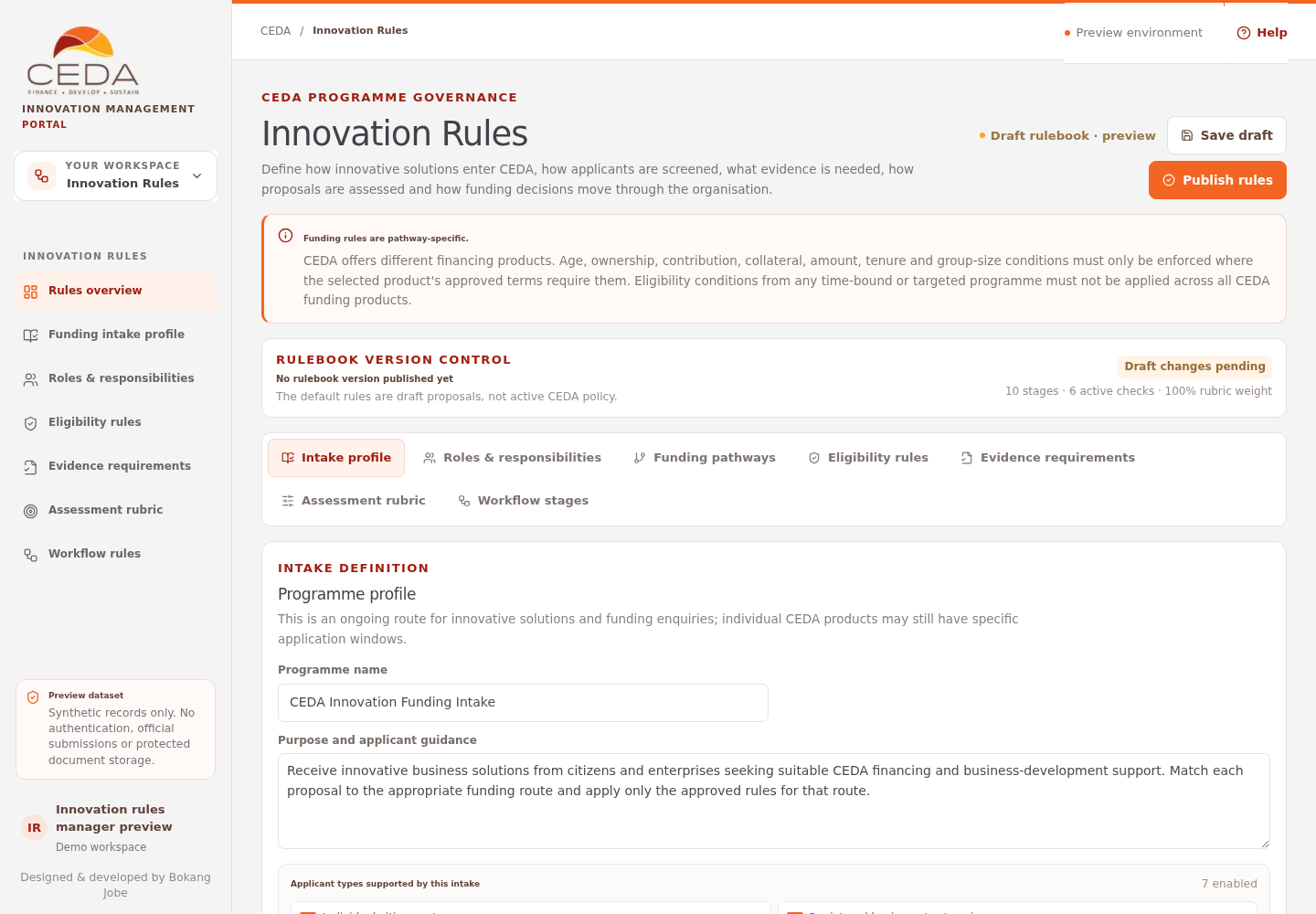
The page is organised into a header, a funding-policy boundary notice, a version panel, seven configuration tabs, a validation area, a draft/publication action bar and a local activity history.
| Screen area | What it shows |
|---|---|
| Header actions | Save draft and Publish rules |
| Funding-policy notice | Reminds administrators to keep product conditions specific to the selected CEDA pathway |
| Rulebook version panel | Published preview version and date, whether draft changes are pending, workflow-stage count, enabled eligibility-check count and the rubric-weight total |
| Configuration tabs | Seven areas for defining the intake and its operating rules |
| Validation panel | Issues that must be resolved before a rulebook can be published |
| Bottom action bar | Draft-storage explanation and a second Publish rulebook action |
| Rulebook activity | Recent local save and publication events |
The header and bottom Publish buttons perform the same publication action. The page automatically writes changes to this browser while it is open; Save draft also adds a local activity event and displays a confirmation notice.
3. Navigate the seven configuration tabs
Select a tab to open its editor. The page keeps the other configuration areas in the same draft; switching tabs does not publish the current changes.
| Tab | What you configure |
|---|---|
| Intake profile | Programme name, purpose and the applicant categories supported by the overall intake |
| Roles & responsibilities | Operational functions, active status, information scope and responsibilities |
| Funding pathways | Separate CEDA product routes, reference links, applicant types and linked eligibility/evidence items |
| Eligibility rules | Named applicant-fit and product-condition checks, whether each is enabled and its intended scope |
| Evidence requirements | Supporting information requested and the reason or circumstances for requesting it |
| Assessment rubric | Scoring criteria, percentage weights and the five-point score descriptors |
| Workflow stages | Stage names, descriptions, responsible process function, order, applicant visibility and exit-reason requirements |
Use the Programme profile and funding pathways guide for intake and product setup, Roles and workflow for process ownership, and Rubric and publication before publishing.
4. Configure in a controlled order
Work through the tabs in this order:
- Intake profile: describe the ongoing innovation enquiry and select the broad applicant categories that the intake can receive.
- Funding pathways: confirm which financing routes are relevant and keep each route's terms separate.
- Eligibility rules: define the checks that may apply, then link only the relevant checks to each pathway.
- Evidence requirements: define what each item proves and connect it to the routes that need it.
- Roles & responsibilities: define the functions that own the process.
- Workflow stages: assign every stage to an active function and decide which statuses applicants can see.
- Assessment rubric: configure the proposed appraisal dimensions and make the weights total exactly 100%.
This is a configuration sequence, not a mandated CEDA operating procedure. CEDA must approve the final process, thresholds and assessment model.
5. Read the version and validation indicators
The version panel helps distinguish the draft from the latest published preview:
- Awaiting first publication means this browser has no published rulebook version yet.
- Published version followed by a number identifies the latest local preview version.
- Draft changes pending means the current draft differs from the published configuration.
- Draft matches published means the current draft matches that version.
- The stage, check and weight figures summarise the current draft, not a production policy register.
When an issue is present, the Rulebook checks before publish panel lists it. Select the relevant tab, correct the underlying configuration, and return to the panel. Publish rules remains disabled while validation issues exist.
6. Understand what publication changes
When a rulebook is published in the preview:
- a new version number and publication timestamp are recorded in the current browser;
- the previous published version is retained in the local version history;
- the local activity list records the publication event;
- Operations can read the published workflow-stage configuration for its stage labels, ordering and stage-related behaviour; and
- new evaluator assignments can copy the published rubric into a versioned assessment snapshot.
Publication does not update the Applicant form definition, create an official product, send notifications, approve a funding decision, or turn process-role descriptions into portal access permissions.
7. Keep the rulebook pathway-specific
This workspace represents an ongoing innovation-to-funding intake, not a competition or hackathon. Individual CEDA products may still have their own application windows and approved conditions.
Do not apply one product's age, ownership, contribution, group-size, security, amount or repayment terms to every funding route. Confirm current product terms with CEDA before treating any condition as an eligibility gate.
8. Understand the preview boundary
The rulebook is saved in browser local storage. It is not shared with another browser profile or device and is not a central CEDA policy record. A reset, cleared browser data or unavailable browser storage can affect the preview configuration.
Production use requires authorised policy approval, controlled server-side storage, audit history, access enforcement and a formal release process.